Recently we get enormous amount of spam registration. We have closed the registration for new members, sorry...
0 votes
831 views
by

I have a problem, the field of ChLength, LLenght and RLenght are NULL, but I do not know why this should be, because I have projected all around WGS 84 / UTM zone 19 S (EPSG 32719)
What can be or what is the right coordinate system to use?

https://www.dropbox.com/s/2w9h4muezcw6wmj/prueba24.rar?dl=0


Best regards,
Carolina.

1 Answer

0 votes
by (3.8k points)

Carolina,

There are several problem regarding your data:

1. Your flowpaths type are named channel, left and right. While you should use Channel, Left and Right. Sorry for that - it should be less restrictive and we will change it in the next release.

2. You have to flip ROB and LOB flowpaths direction:
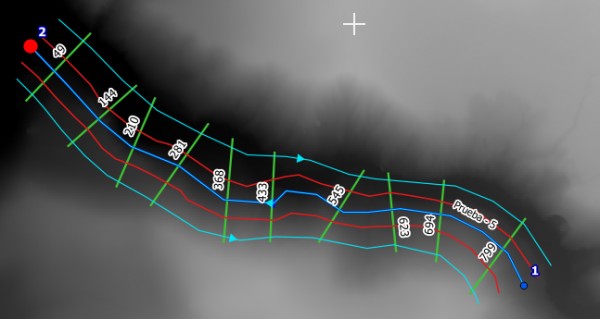
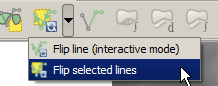
All the flowpaths direction should be the same. Use the Flip tool from the Digitizing Tools plugin:
3. Your raster has WGS 84 / UTM zone 19S projection which differs from your vector data projection (SAD69 / UTM zone 19S). Reproject the raster using Raster > Projection > Warp (Reproject).

Let us know if that helped.

by (3.8k points)
The Flip tool is not a part of the step by step instructions. It is a general requirement that the flowpaths should be directed downstream.

As you can see on the above screenshot, your ROB and LOB flowpaths are directed upstream, while they should be directed downstream, as the channel is.
To flip the direction of a line object in QGIS it is best to use the mentioned tool from Digitizing Tools plugin (you have to install it from Plugin Manager).
Simply select the wrong directed flowpaths and run the Flip tool to change their direction.
by
Now yeah!

Many thanks for your help,
Carolina.
Welcome to RiverGIS Q&A, where you can ask questions and receive answers from other members of the community.

Visit rivergis.com for documentation and general info about the QGIS plugin.

Categories

...